
A website feedback form is the quickest way to hear from the people using your website. Visitors click a feedback button or answer a short survey, and you find out what they think, what’s confusing and what’s broken.
The hard part is knowing what to ask. A form that’s too long gets abandoned, and a form that asks the wrong question gives you answers you can’t use. So we’ve put together the 5 most useful website feedback form templates, with example questions you can copy:
- Customer Satisfaction Score (CSAT)
- Customer Effort Score (CES)
- Net Promoter Score (NPS)
- New Feature Request
- Bug Report Survey
The short answer: use a bug report form on your web app or beta, a feature request form where existing customers spend time, and a one-question CSAT or CES survey after a purchase or support conversation. Use NPS every few months to track loyalty over time. Keep every form to three questions or fewer where you can.
Which feedback form should you use?
| Form | What it tells you | Typical question | Best place to use it |
|---|---|---|---|
| CSAT | How satisfied people are with one experience | “How satisfied are you with…?” (1 to 5) | After a purchase, support chat or onboarding |
| CES | How easy something was | “[Company] made it easy to handle my issue” (1 to 7) | After support, checkout or reading help content |
| NPS | Long-term loyalty | “How likely are you to recommend us?” (0 to 10) | Every few months, or a while after sign-up |
| Feature request | What customers want next | “What would you like us to add, and why?” | In your app, help pages and community pages |
| Bug report | What’s broken, and where | “What went wrong?” plus a screenshot | In your app, on new features and during a beta |
Below you’ll find a ready-made template for each one, with the question and rating scale to use and the pros and cons of each.
1. Customer Satisfaction Score (CSAT)
A ready-to-use template for measuring Customer Satisfaction Score (CSAT) courtesy of our friends at Refiner:

What is CSAT?
Customer Satisfaction Score (or CSAT for short) is a very common survey type used to measure how satisfied customers are with a service, a product, or a customer experience. CSAT provides a quantitative metric of customer satisfaction after a certain event.
A fully detailed description of CSAT can be found on Wikipedia.
When should I use CSAT?
CSAT is typically used by companies to measure the level of customer satisfaction after certain key events, such as:
- Sales transactions
- Customer support phone calls
- Onboarding processes
- Customer training
The key to success is sending a CSAT survey right after these activities have finished. That’s when customers have both problems and positive remarks fresh on their minds.
CSAT is simple and easy to use. You get easily comparable numerical figures as output. One great thing about CSAT is that industry benchmark scores are readily available online. It’s easy to compare your own results to others and see where you’re standing.
What is the CSAT question and rating scale?
Most commonly the CSAT question is formulated as: “How satisfied are you with our [product/service]?”. You can replace the section in brackets with anything you’re trying to get feedback on.
Typically this question is paired with a 5-point rating scale:
- Very unsatisfied
- Unsatisfied
- Neutral
- Satisfied
- Very satisfied
Note that the scale shown to customers doesn’t have to be numerical. You can assign values to answers behind the scenes.
How can I calculate CSAT scores?
The total CSAT score can be calculated with the equation:
(Number of satisfied customers (4) + Number of very satisfied customers (5)) / Number of total responses * 100% = Percentage of satisfied customers.
You only include satisfied and very satisfied customers in the above equation, because the two highest scores are the best predictor of which customers will keep using your company.
For example, let’s say we got a total of 200 answers. 90 of these answers ranked satisfied (4 on the above scale) and 70 very satisfied (5 on the above scale). Our CSAT score would then be:
(90 + 70)/200 * 100% = 80%.
What are the pros and cons of CSAT?
As a recap, let’s go over the pros and cons of the CSAT survey method.
Pros of CSAT include:
- It’s short - people are more likely to answer short surveys
- You get a simple, quantifiable number as an output
- Easily customizable survey type
Cons of CSAT include:
- Doesn’t allow for a lot of detail or depth
- Easily ignores neutral customers
2. Customer Effort Score (CES)
A ready-to-use template for measuring Customer Effort Score (CES) courtesy of our friends at Refiner:

What is CES?
Customer Effort Score (CES) measures how easy (or hard) it is to interact with a company. Some argue that ease of using a product or a service could sometimes be a better indicator of customer loyalty than just simply measuring customer satisfaction.
CES was actually developed by a company called CEB Global (now a subsidiary of Gartner) in 2010. CEB noticed in their own research that almost all customers who had to put in a lot of effort to interact with a company became disloyal customers. You can still find the original CES research online.
When should I use CES?
CES is best suited to be used in the following situations:
- After a purchase/subscription
- After dealing with customer service
- After reading a help center article or similar documentation
How do CSAT and CES differ? Think about it like this: If CSAT measures the short-term customer satisfaction for a single customer event (like a sales transaction), CES reveals hiccups and problems in the overall customer service experience.
What is the CES question and rating scale?
A CES survey typically poses this statement to the customer: “[Company] made it easy for me to handle my issue”
This statement is then paired with a rating scale ranging from 1 to 7:
- Strongly Disagree
- Disagree
- Somewhat Disagree
- Undecided
- Somewhat Agree
- Agree
- Strongly Agree
How can I calculate CES scores?
The total CES score can be calculated by summing up all of the customer effort scores and dividing by the total number of respondents.
For example:
Let’s say we got a total of 8 responses from our CES survey with the following scores: 4,4,5,7,7,6,3,6
Our total CES scores would then be: (4+4+5+7+7+6+3+6) / 8 = ~ 5.3
As with CSAT, compare your score over time rather than chasing a single number. A rising CES means customers are finding it easier to deal with you.
As a recap, let’s go over the pros and cons of the CES survey method.
What are the pros and cons of CES?
Pros of CES include:
- A good predictor of customer retention and loyalty
- Simple and standardized
- Easy to calculate
Cons of CES include:
- Risk of oversimplifying the customer experience
- Time-sensitive: feedback needs to come soon after the experience
3. Net Promoter Score (NPS)
A ready-to-use template for measuring Net Promoter Score (NPS) by Saber Feedback:

What is NPS?
Net Promoter Score (NPS) measures customer loyalty. It’s an index ranging from -100 to 100 and measures the willingness of customers to recommend a company’s products or services to others. Higher scores mean higher customer loyalty.
When should I use NPS?
NPS could be used for example in the following situations:
- A couple of days after a customer has started a new product trial
- At specific intervals, e.g. every 6-12 months
- After a customer has engaged with customer support
- After a customer has purchased something
NPS is widely used as a headline customer experience metric. The reasons are its simplicity and effectiveness: NPS basically asks whether you’re willing to put your own reputation at risk to recommend a product or service to others.
How does NPS compare with CSAT and CES? We already mentioned that CSAT measures satisfaction for one certain event and CES reveals hiccups in the whole customer service experience. In contrast, NPS focuses on measuring long-term customer loyalty.
What is the NPS question and rating scale?
An NPS survey asks the following question: “How likely are you to recommend [a product, a service, a company] to a friend or a colleague?”
This question is then paired with a rating scale ranging from 0 (Not at all likely) to 10 (Extremely likely). Depending on the answer, the customers then fall into 1 of 3 categories:
- Promoters = respond with a score of 9 or 10. These are loyal customers.
- Passives = respond with a score of 7 or 8. These are satisfied but not enthusiastic customers.
- Detractors = respond with a score of 0 to 6. These are unhappy customers who might discourage others from buying from you.
How can I calculate NPS scores?
The final NPS score is simple to calculate. The idea is just to subtract the percentage of detractors from the percentage of promoters.
For example:
Let’s say 5% of NPS survey respondents are detractors, 30% are passives and 65% are promoters.
Our total NPS score would then be: 65 - 5 = 60. NPS is given as a number, not a percentage.
NPS benchmark scores are widely available online, so it’s easy to compare your results with other companies. For a deeper look at NPS and the tools that measure it, see our NPS tools comparison.
What are the pros and cons of NPS?
As a recap, let’s go over the pros and cons of the NPS survey method:
Pros of NPS include:
- Easy and intuitive to use.
- Used by companies everywhere - benchmarking is a breeze.
- Reveals your most loyal customers.
Cons of NPS include:
- Possible lack of context in scoring: you might not know why you received a particular score. Add an optional follow-up question, such as “What’s the main reason for your score?”, to fix this.
4. New Feature Request
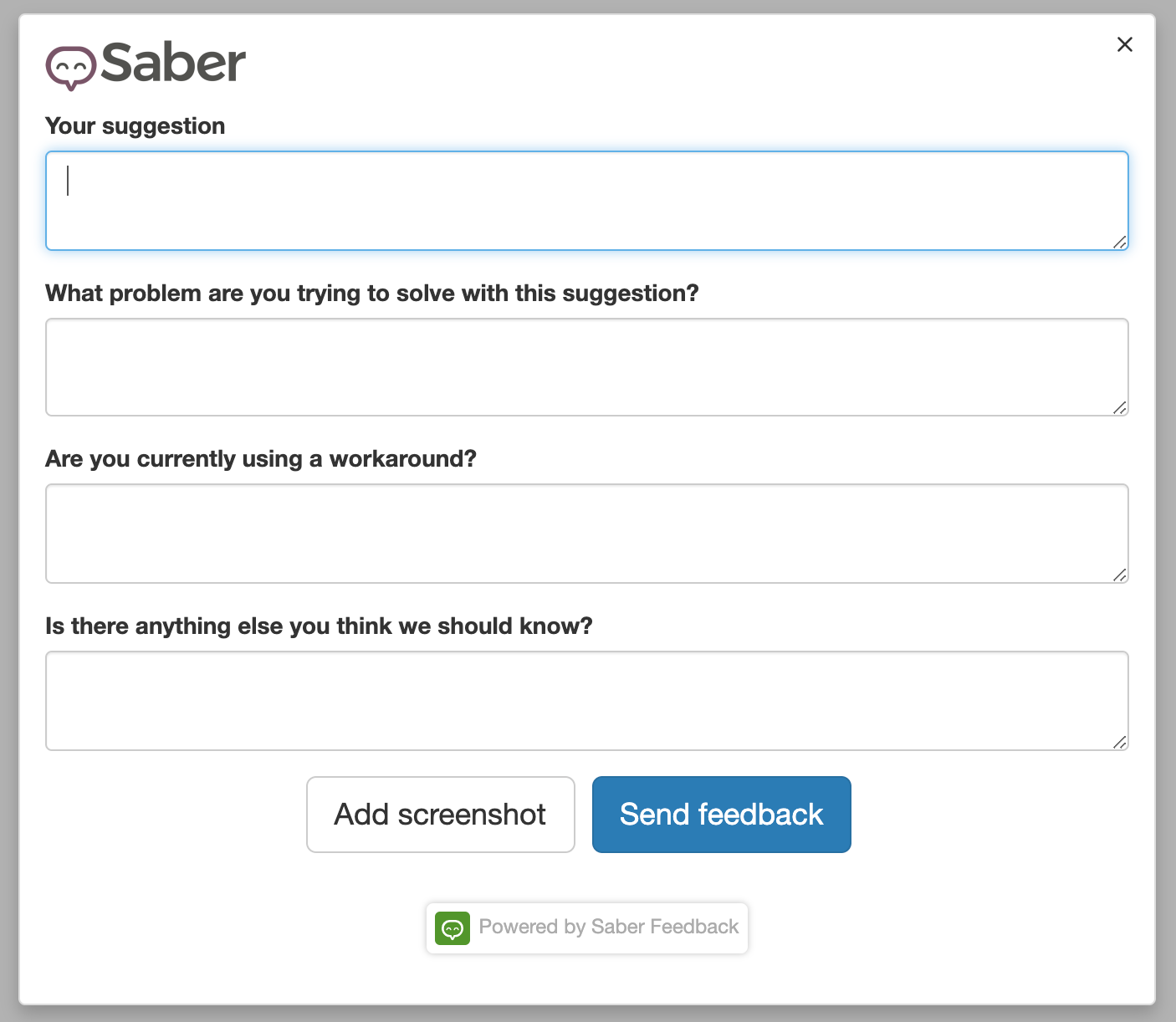
A ready-to-use template for collecting new feature requests by Saber Feedback:
What is a feature request form?
A feature request form helps you collect and structure the wants and wishes of your customers. New feature requests could come in many forms and channels. With a proper request form, you can tag and organize these requests easily so your team doesn’t get overwhelmed.
When should I use a feature request form?
You could use a feature request form if your product/service is:
- SaaS
- An online course
- A digital product
- A physical product
Your users and customers are some of the best people to suggest how you can improve your product. They probably use your product more than you do and know what it does well and where it struggles. Their insights can directly help you build a better product.
What should a feature request form include?
Compared to CSAT, CES, and NPS (which provide more quantitative feedback data) a feature request form only gives back qualitative feedback. That doesn’t make it less valuable though. When asking for people to suggest new features it’s good to ask at least for the following things:
- The new suggested feature
- What problem are customers trying to solve with that feature
- If they’re currently using a workaround
- Additional info
If you’re going full steam ahead with product development, then user suggestions could be your main priority. In this case, make sure you ask specifically for suggestions and feature requests.
You’ll particularly want to ask for this kind of feedback on website pages browsed by your existing customers (or trial customers). These might include help documents, community pages, and contact pages.
What are the pros and cons of feature request forms?
As a recap, let’s go over the pros and cons of feature request forms:
Pros of feature request forms include:
- Helps you get structured suggestions about new features
- Helps map a picture of changing customer needs over time
- Lets you prioritize and organize your product roadmap
Cons of feature request forms include:
- Might mean more work for your customer support and development teams
5. Bug Report Survey
A ready-to-use template for collecting bug reports by Saber Feedback:

What is a bug report survey?
If you have just launched a new feature or beta product, your priority might be tackling bugs. That’s when a bug report survey might prove itself invaluable. It’s essentially a form that asks which errors or problems the user has encountered while using your software.
When should I use a bug report survey?
A bug report survey makes most sense if your product is a website, web app or other software.
Fixing bugs is unglamorous. However, it will:
- Improve your user experience
- Help you convert and retain customers
- Save you maintenance costs down the line.
This article lists 10 reasons why you should fix bugs as soon as you find them.
What should a bug report survey include?
The actual setup of your form will depend on the knowledge level of your users. It’s good to ask at least the following things:
- What’s the problem?
- How can we reproduce the problem?
- Can you suggest a solution? (optional)
Making it easy for your users to give visual feedback on bugs simplifies the process and avoids confusion. Your feedback tool should also automatically capture technical details. If your product is web-based, our website testing checklist covers how to catch bugs before your users do.
You need to know whether a bug can be traced back to a specific browser version or Javascript error, and asking users for all this information is time-consuming and not always feasible.
What are the pros and cons of bug report surveys?
Pros of bug report surveys include:
- Helps you improve your product - bugs actually get fixed
- Reveals the parts of SaaS that have more issues than others
- Gives people a way to be heard in case they encounter bugs
Cons of bug report surveys include:
- It might be difficult to get the needed info from a user in a short period of time
Tips for getting more responses
A good template only helps if people fill it in. These habits make the biggest difference:
- Keep it short. One rating and one optional comment box is often enough. Every extra question loses some people.
- Ask at the right moment. Ask about checkout right after checkout, not a week later by email.
- Make the form easy to find. An always-visible feedback button works for bug reports and ideas. A short pop-up works for CSAT and CES after a specific action.
- Use follow-up questions. Ask “What could we do better?” only when someone gives a low score, so happy customers can finish in one click.
- Capture the technical details automatically. For bug reports, attach the page URL, browser and a screenshot so you don’t have to ask.
- Reply to what you receive. People give more feedback when they see it’s read and acted on. Our guide to responding to customer feedback has example replies.
Not sure how much feedback to expect? Our website feedback benchmarks show typical feedback rates, with a calculator for your own site.
What’s next? Processing your feedback
Gathering user feedback should lead to better outcomes for your product or company, so processing feedback is as important as gathering it.
Decide where feedback should go before you start. Into one dashboard? To one email address? Or straight into the project management, chat or issue tracking tools your team already uses?
Choose a method that fits the way your team already works rather than adding another place to check. You’ll be more likely to act on the feedback you receive, and that’s where the value is.
Use these templates with Saber Feedback
Saber Feedback adds a feedback button to your website, and lets you build any of the forms above.
- 14 field types, including star ratings, emojis, thumbs up and down, and NPS
- Follow-up questions based on earlier answers
- Browser details attached to every report
- A customizable button, shown in 15 languages
- Screenshots, and native integrations with Jira, Slack, Trello, Asana, Zendesk and more, from the $99/month Startup plan
Every plan has unlimited page views and unlimited feedback. The 30-day free trial includes every feature and needs no credit card. Start your free trial or see pricing.